Pixel Transforms
A DICOM image often stores details of one or more operations that may be applied to the pixel values stored in the object. These operations are referred to as “pixel transforms”. For the purposes of pixel transforms, we can classify images into three types:
Monochrome images are those with a single sample per pixel and a photometric interpretation of “MONOCHROME1” or “MONOCHROME2” meaning that they are intended to be displayed in grayscale.
Color images are those with 3 samples per pixel.
Palette Color images are those stored with a single sample per pixel and a photometric interpretation of “PALETTE COLOR”, meaning that they are intended to be transformed into color images (via a lookup table) before being displayed as color images.
The following diagram shows the possible pixel transforms for each image type. Each transform may or may not be present in a particular image. The transforms must be applied in the order shown in the flowchart if they are present, and missing transforms can be assumed to be the identity transform.
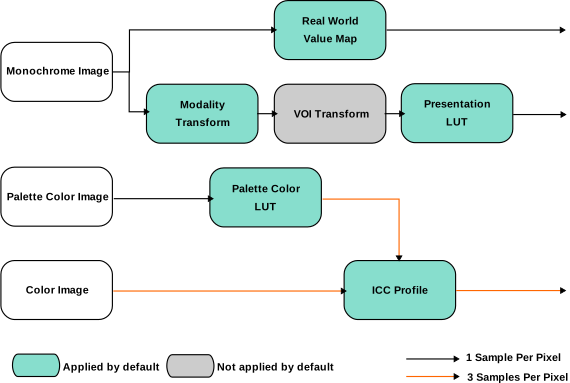
Flowchart of all possible pixel transforms and their order of application for monochrome, palette color and color images.
Monochrome images have two alternative pathways through this flowchart, either the real world value map is applied or some combination of the modality transform, VOI transform, and presentation LUT is applied. The real world value map should not be applied in combination with any of the others.
The real world value map was introduced to the standard more recently than the modality transform, VOI transform and presentation LUT, and in most IODs its inclusion is optional. By contrast, the modality transform is more common and more likely to be implemented correctly by viewers. Thus it is fairly common for an image to contain parameters for transforms on both of these pathways.
In multi-frame images, parameters for pixel transforms may be specified on the level of an individual frame or a single set may be used all frames.
Pixel Transforms in Highdicom
The highdicom.Image class has several methods that return frames or
arrangements of frames from a DICOM image:
These methods share a set of parameters that control which pixel transforms are applied and how they are applied.
The parameters apply_real_world_transform, apply_modality_transform,
apply_voi_transform, apply_presentation_lut,
apply_palette_color_lut, and apply_icc_profile govern whether or not
the corresponding transform is applied. With the exception of
apply_presentation_lut (which is a bool), they can each take one of
three values:
True, in which case the transform is always applied and an error is raised if the transform parameters are missing from the image object.False, in which case the transform is never applied regardless of whether or not relevant parameters are found in the image object.None, in which case the transform is applied if its parameters are found in the image object, but skipped without error if the parameters are not present. This is the default for most of the transforms (except the VOI transform).
If you pass False for any transform, you must also pass False for any
later transform that depends upon that transform.
The default set of parameters means that by default:
For monochrome images the real world value map will be applied if it is present. If it is not present, the modality LUT and presentation LUT will be applied if they are present. The VOI transform is never applied when using the default parameters and must be explicitly enabled.
For color images the ICC profile will be applied if it is present.
For palette color images, the palette color LUT will be applied (it should always be present for palette color images). The ICC profile will then be applied if it is present.
Now we will go through the specifics of each of these transforms in turn.
Real World Value Map
A real world value map is a transform that maps stored values to “real world” values, meaning values that have some measurable meaning in some physical unit rather than being simply arbitrary pixel intensities.
It may be represented by either a simple linear transform (a scale and offset), or as an arbitrary function represented by a lookup table (LUT).
There may be multiple instances of a real world value map stored within a
sequence in an image object. The real_world_value_map_selector parameter
specifies which should be used. By default, the first item is used. Values for
real_world_value_map_selector may be either:
An
intused to index the sequence of available maps (first item has index 0). A negative integer may be used to index from the end of the list following standard Python indexing convention.A
strused to match the"LUTLabel"attribute, which is a free-text human readable string identifying the LUT, to select the map.A
pydicom.sr.coding.Codeorhighdicom.sr.CodedConceptused to match the code describing the units of the LUT (contained in the"MeasurementUnitsCodeSequence"attribute). See Coding for more information on using codes.
In highdicom, real world value maps are implemented using the
highdicom.pm.RealWorldValueMapping class.
Modality Transform
The modality transform maps stored values to the modality’s measured values. It is conceptually very similar to a real world value map, except that the output is not guaranteed to have physical meaning and the modality transform lacks attributes associated with a real world value map that describe the meaning and units of the output units.
As with real world value maps, the modality transform may be represented by either a simple linear transform (a scale and offset), or as an arbitrary function represented by a lookup table (LUT).
In highdicom, the modality transform is implemented in the
highdicom.ModalityLUTTransformation class.
Value of Interest (VOI) Transform
The value-of-interest (VOI) transform limits the range of pixel intensities to a particular window that is relevant for a certain purpose. CT images are a typical use case, where the range of Hounsfield units is very large and radiologists typically use an intensity window optimized for viewing certain organs or tissues when viewing images. Different windows are typically used for soft tissue versus lung versus bones, for example.
Where a VOI transform is specified in a DICOM file, it is typically intended as a suggested default setting for rendering the image in a viewer. Since the VOI transform discards information, is application-specific, and is intended for human viewing rather than computational analysis, highdicom does not apply the VOI transform by default even if an image specifies one. However it can be enabled if desired.
A VOI transform is either specified as a pair of windowing parameters (center and width of the intensity window) or as an arbitrary function using a LUT.
There may be multiple VOI transforms stored in a file, typically for different
viewing purposes. The voi_transform_selector parameter controls which will
be used. Values for this parameter may be either:
An
int, interpreted as a (zero-based) index of the list of VOI transforms to apply. A negative integer may be used to index from the end of the list following standard Python indexing convention.A
str, used to match the"WindowCenterWidthExplanation"or the"LUTExplanation"attributes to choose from multiple VOI transforms. Note that such explanations are optional according to the standard and therefore may not be present.A user-defined
highdicom.VOILUTTransformation. This will override any such transform specified in the dataset.
The parameters of the VOI transform stored in the image specify which input
range of intensities are of interest, but does not specify what the range of
the output values should be, leaving this up to the receiver. In highdicom, the
voi_output_range gives a tuple of two floats giving the lower and upper
bounds of the output range. The default values are 0.0 and 1.0, meaning that
the pixels in the window of interest are mapped into the range 0-1.
In highdicom, the VOI transform is implemented in the
highdicom.VOILUTTransformation class.
Presentation LUT
The presentation LUT simply specifies whether or not pixel intensities should be inverted before being displayed. For historical reasons, some DICOM files (mostly various types of X-ray) use the “MONOCHROME1” photometric interpretation, where low pixel values should be displayed as white and high pixel values should be displayed as black. The operation to correct this, i.e. flipping pixel intensities, is known as the presentation LUT.
Unlike the corresponding parameters for the other transforms,
apply_presentation_lut only takes the values True (in which case a
“MONOCHROME1” image will have its intensities flipped and other images are left
unchanged) or False, in which case no images have their intensities
flipped.
Palette Color LUT
A palette color LUT is used to map images stored with a single sample per pixel to RGB color images.
In highdicom, the VOI transform is implemented in the
highdicom.PaletteColorLUTTransformation class.
ICC Profile
An International Color Consortium (ICC) profile describes a transform to make color viewing uniform across devices. It adjusts RGB color values to new sets of RGB color values.